Server
A Server is an Apilane concept that groups an Apilane API deployment. Each server represents a single running instance of the Apilane API service.
What is a Server?
A Server defines the connection URL where the Portal and client applications can reach the API. When you create an application, you assign it to a specific Server — this determines which API instance will handle requests for that application.
| Property | Description |
|---|---|
| Name | A display name for the server (e.g., "Production", "Staging") |
| URL | The base URL where the API service is accessible (e.g., https://api.example.com) |
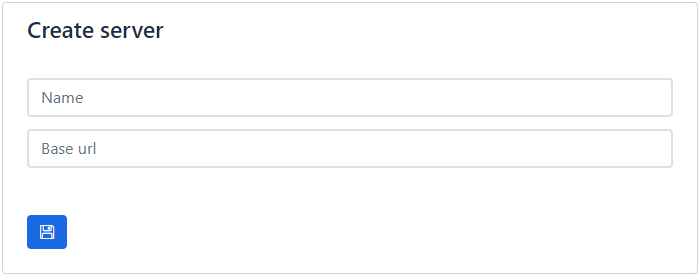
Create
A Server has a URL where the Portal and any client application can access the API.
Multiple servers
An Apilane Instance might consist of more than one server. This is useful for separating environments or scaling workloads:
| Use Case | Example Setup |
|---|---|
| Environment separation | One server for development/staging, another for production |
| Geographic distribution | Servers in different regions for lower latency |
| Workload isolation | Separate servers for different application groups |
Example: Multi-server setup on Kubernetes
This hypothetical instance consists of 2 Servers — one used for testing and another for production.
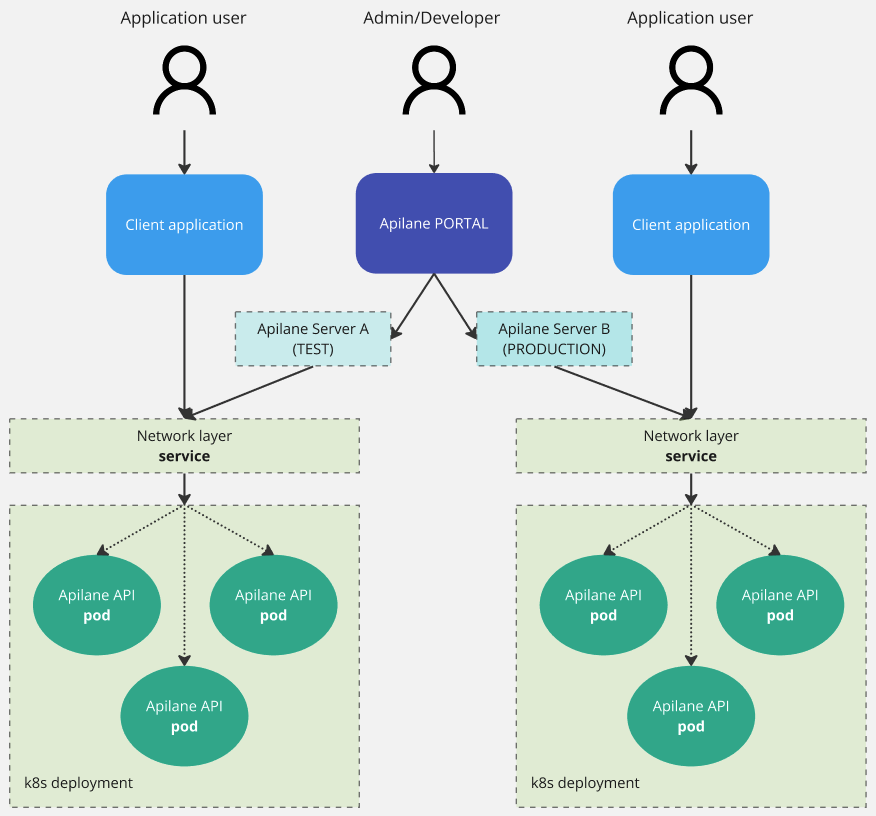
Each server runs its own Apilane API container, but all servers are managed from a single Portal. Applications are assigned to a specific server at creation time.
Relationship to applications
- Each application belongs to exactly one server
- Each server can host multiple applications
- The server is selected when creating an application and determines where the application's API endpoints are available
- Applications on different servers are completely independent — they have separate databases, file storage, and security configurations